Push INCLUDED
A notification from the SMAAT app on the participant's phone.
Each notification schedule can deliver its prompt as a push notification, an email or an SMS (text message). The schedule defines which channels are used, in which order, and whether they are sent together or one after another.
The schedule names the channels. For every participant, SMAAT then checks whether each channel can reach that person and whether the current time falls into the participant's quiet time. A channel that fails a check is skipped for that participant.
Each schedule lists one or more channels (push, email and SMS) in any order. Push is not required, and different schedules can use different channels.
Email and SMS reach only participants who enabled the channel for the study and verified their email address or phone number in the app. Push needs a registered device and notification permission.
If the study uses the Quiet Time section of prescreening, no channel delivers during a participant's quiet periods, evaluated in the participant's own time zone. SMS is also limited by the credit balance and the study's monthly SMS cap.
On the channels the participant enabled, outside their quiet time.
Push and email have no per-message charge. SMS is paid from prepaid credits.
A notification from the SMAAT app on the participant's phone.
A message to the participant's inbox.
A text message to the participant's phone number.
Participants confirm their email address and phone number in the app's Settings and then enable the channel for the study. In the Study Builder, Preview → Permissions shows the "Message Channels" card that participants see when a schedule uses email or SMS.
A push notification can fail to reach a participant without any visible error: Do Not Disturb, disabled notifications, battery-saving modes and an uninstalled app all prevent it from being seen. A prompt that is also sent by email or SMS has another route to the participant.
Some prompts are lost on the device.
The same prompt has more than one route.
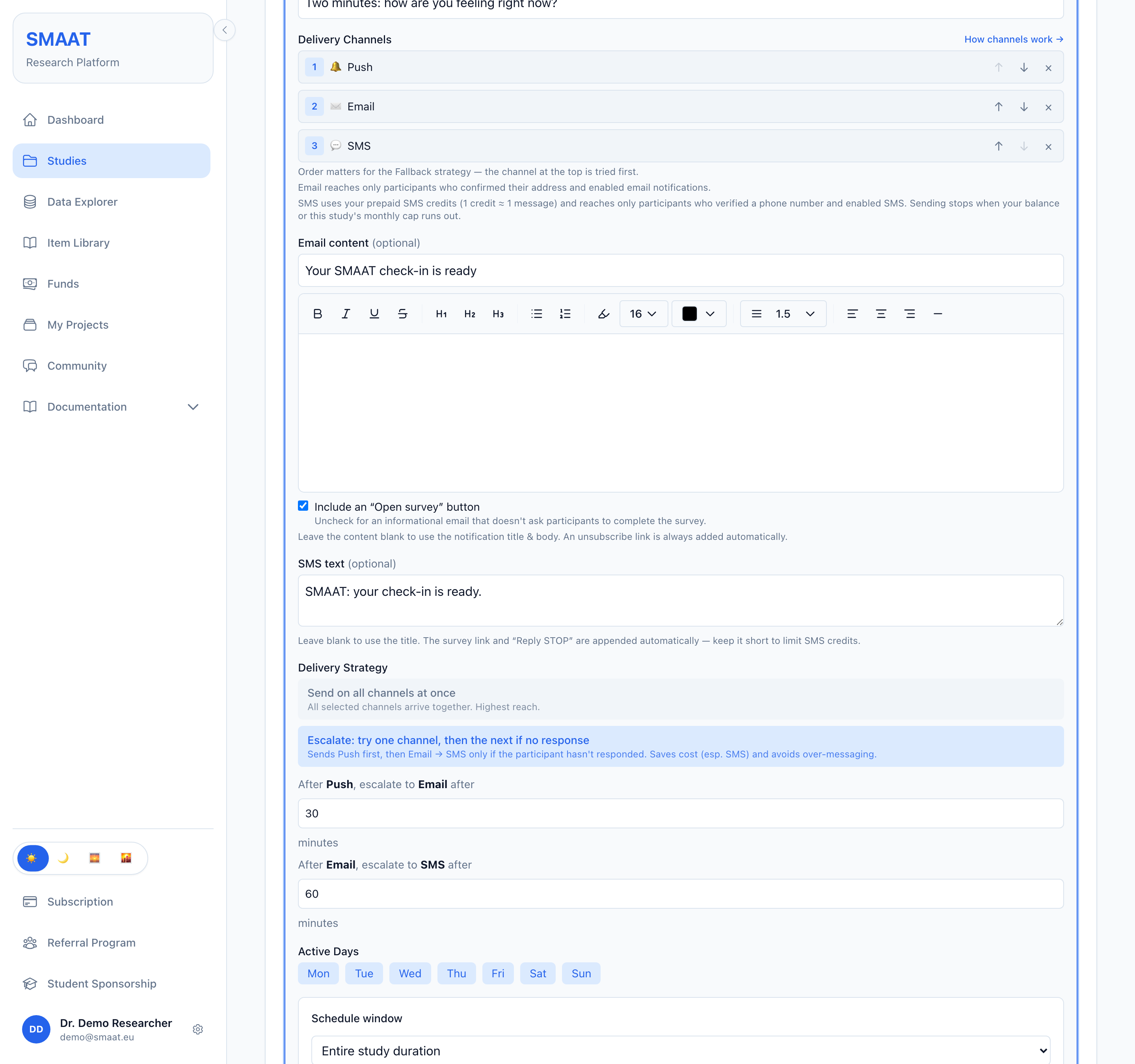
When a schedule has more than one channel, a Delivery Strategy choice appears: send on all channels at once, or escalate from one channel to the next.
All selected channels are sent at the same time.
The first channel in the list is sent. If the participant has neither opened the notification nor completed the survey after a set wait, the next channel is sent, and so on down the list. Each gap between two channels has its own wait in minutes (default 30, minimum 1), so three channels have two waits. The order below is one example.
Channels are set per schedule: Study Builder → Protocol → Surveys → select a survey → Notification Schedule → open a schedule card.
An illustration of how three schedules with different channel settings reach one participant.
Defined in Participants → Prescreening → Quiet Time. Participants enter daily times, weekdays or calendar dates during onboarding, and no channel delivers in those periods, evaluated in the participant's own time zone. Without this section there is no quiet time.
Email and SMS reach only participants who enabled the channel for the study and verified the email address or phone number in the app.
Every email contains an unsubscribe link. With the default one-way SMS sender, each SMS ends with "Opt out in the app.", and participants turn SMS off for the study in the app. A sender that accepts replies uses "Reply STOP to opt out." instead.
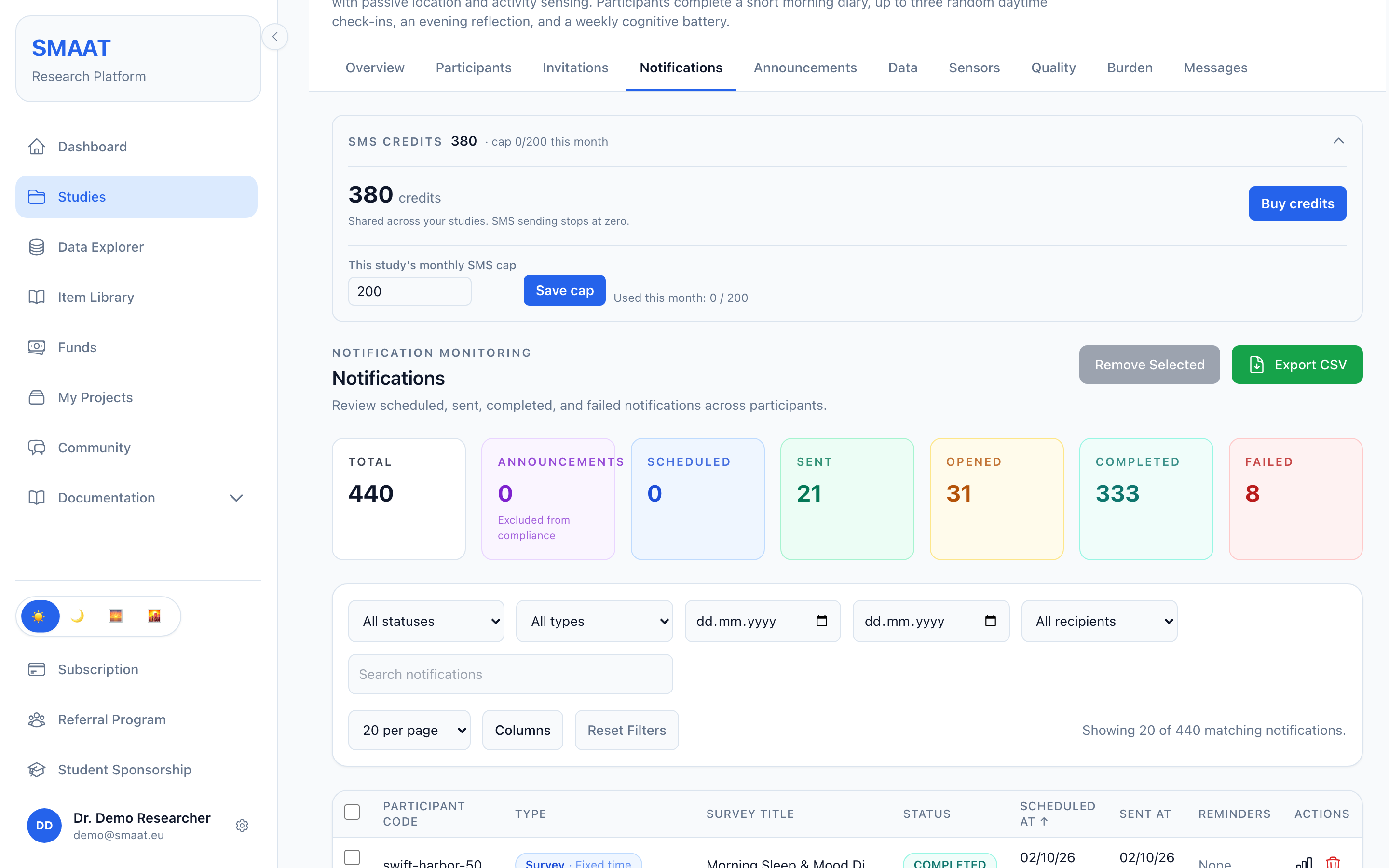
SMS sending stops when the credit balance or the study's monthly SMS cap is used up. Push and email are not affected.
Each SMS costs credits from a prepaid balance that is shared by all studies of the researcher's account. Sending stops when the balance reaches zero, and there is no post-paid billing.
Enter the Schedule Name, Notification Title and Notification Body.
Add and order the channels, fill in the email and SMS content, and choose a Delivery Strategy.
Activation turns the schedules into notifications for enrolled participants and for everyone who joins later.
On the study Notifications page, each notification's delivery details show its status, channels, strategy, the send outcome per channel and the channel the participant responded through (last touch).
Channels are set per schedule. Push, email and SMS can be combined in any order, with at least one channel.
Two strategies. All channels at once, or escalation to the next channel while the prompt is neither opened nor completed.
Email and SMS need opt-in. Participants verify the contact detail and enable the channel for the study.
Quiet time covers all channels. It applies when the study uses the Quiet Time section of prescreening.
SMS costs 1 credit per segment. The balance is shared across studies, and each study can have a monthly cap.
Nothing is sent before activation. Schedules take effect with Validate & Activate.